
THE ARENA IS CALLING
Arena of
Champions
Your next duel is a browser tab away.
Arena of Champions brings WoW-style PvP into your browser. Enter as a guest, choose a hero, and find your next fight in the arena. This independent guide helps you get from the login screen to your first match.
The battleground
Desktop · Keyboard & mouse · English game interface
Click inside the game to enable keyboard controls.
If the game does not appear, open the official site or reload.
Fullscreen support varies by browser. Use a desktop keyboard and mouse for gameplay.
Open Official GameAn independent guide. Game provided by arenaofchampions.live.
◆01 / THE GAME
Arena of Champions, a different way in.
Arena of Champions is an independent fantasy combat game with a shared town and small-team arena battles. You can open the browser client without installing a desktop application. The emphasis is on choosing a class, learning its abilities, and meeting other players in PvP.
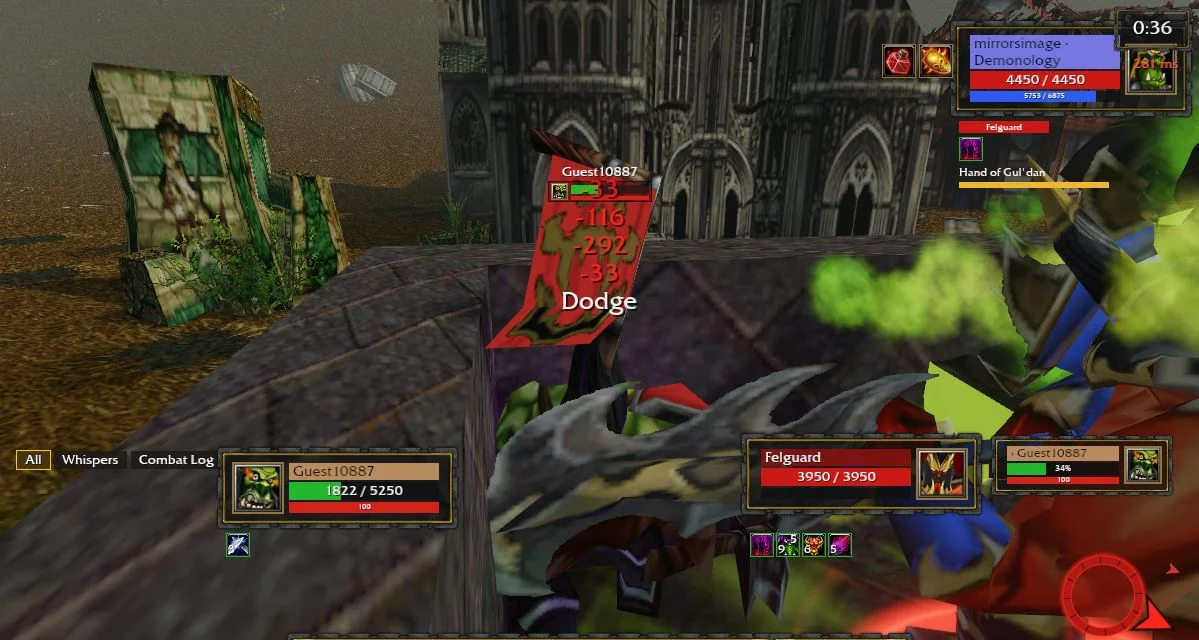
Our hands-on check of Arena of Champions used the embedded browser game: we entered as a guest, moved through town, spoke to the Arena Battlemaster, and completed an unrated 1v1 match. That confirms a working route into combat on our test setup; availability and performance still depend on your browser, connection, and the game server.
Arena of Champions is separate from the official World of Warcraft service. This website is an independent guide and game entry point. The game itself runs from arenaofchampions.live, and its interface is currently in English.
◆02 / How to play
From first visit to first fight.
Enter as a guest
Open the Arena of Champions player and choose Play as Guest on the login screen. Let the town finish loading before clicking again. You do not need to enter an email or password to try this route.
Choose your class
In Arena of Champions, the Heroes panel lists the available classes. Read the class description and inspect the ability bar before joining a match. Start with one hero so you can learn its buttons without changing your entire setup.
Find the Battlemaster
Move through the Arena of Champions town with WASD. Approach Samuro, the Arena Battlemaster, and right-click his character. If the game says you are too far away, move closer and interact again.
Pick your fight
Choose 1v1, 2v2, or 3v3 in the Arena of Champions queue dialog. Join Unrated is a useful first stop. When a match is ready, use Enter Arena before the on-screen invitation expires.
◆03 / ARENA MODES
Choose the size of your fight.
Arena of Champions offers three team-size options at the Battlemaster. Rated and unrated queues are shown separately. Our completed test covered unrated 1v1; the other modes were observed in the menu, not individually match-tested.
The duel
Arena of Champions with one player on each side. A focused way to get comfortable with targeting, movement, and your ability bar.
The partnership
Two-player teams in Arena of Champions. Check the queue options in the game and coordinate your approach with a teammate.
The team fight
Three-player teams in Arena of Champions. More allies and opponents make awareness and communication part of the challenge.
◆04 / Classes
Find your kind of champion.
The Arena of Champions Heroes panel currently lists these nine classes. Class names and specialization labels below reflect the inspected Heroes panel. Explore the descriptions and spells yourself; this is an overview, not a tier list or a promise that one class will win.
Warrior
Mage
Priest
Rogue
Hunter
Paladin
Warlock
Druid
Shaman
◆05 / CONTROLS
Know your keys before the gates open.
Click inside Arena of Champions to give the player keyboard focus. The controls below were checked in the browser client. Use the labels on your current action bar when abilities or bindings change.
- W A S D
- Move your character
- Right click
- Interact with a nearby NPC
- 1–8
- Use the labeled action-bar slots
- Tab
- Cycle your target
Arena of Champions is best approached here with a desktop keyboard and mouse. The website fits a phone screen, but we have not verified touch gameplay. Fullscreen gives the game more space; reloading may interrupt your current session.
◆06 / FAQ
Before you enter Arena of Champions
Can I try Arena of Champions without an account?
Yes. Arena of Champions offers Play as Guest, which was available and successfully entered the town in our browser test. If you later want to save progress, use the provider’s own account interface. We have not tested account persistence, and this website does not collect game credentials.
Does Arena of Champions need a download?
The Arena of Champions browser client runs on the official website and can load in the player above. A Windows download is also offered by the provider. It is optional for the browser route; we have not installed or tested that executable.
Where is the official Arena of Champions game?
The Arena of Champions game source is arenaofchampions.live. Use Open Official Game to visit it directly. Arenaof-champions.com is this independent guide, so game accounts and server availability are handled by the game provider.
What if Arena of Champions stays blank?
Give the initial game resources time to load. If the player remains blank, use the official-game link, try a current desktop browser, and check your connection. A loaded frame alone does not prove that a match can start.
Is Arena of Champions the official WoW arena?
No. Arena of Champions is a separate, WoW-style browser game. Your World of Warcraft characters and subscription are not part of this website. Read the game’s own interface for its current rules and account options.
Can I play Arena of Champions in Korean?
This guide has a Korean version, including navigation and getting-started help. The embedded game is the same English client on both pages. Switching the site language does not translate the game interface.
◆CALL TO ARMS
Ready for your first round?
Return to the Arena of Champions player, pick a hero, and take time to learn the controls before joining a queue.